

Microsoft: You Own The Best Software Keyboard There Is. Please Let Us Buy It
There are lots of software keyboards for smartphones and tablets alike, but one stands head and shoulders above the rest… However you can't have it.
Last year, Microsoft bought Nuance for just shy of $20 billion, mainly for its voice-to-text tools. Nuance also owned Swype, which it killed off in 2018. Microsoft, meanwhile, also owns Swiftkey, which it still offers.
The Reg liked both. We called Swype "The world's fastest text entry system", and said that Swiftkey's predictive engine was so good it was a "psychic keyboard."
Swiftkey still has the best text-prediction engine in the business, but it wasn't built for swiping: that came in with version 4. Swiftkey is fairly good at it, but there are some wrinkles that Swype still does better.
And that is one of the strange things: although it was discontinued in 2018, and despite it allegedly only being available to OEMs, it's still lurking in the recesses of the Play Store.
Your correspondent bought it very soon after his first Android device, and the app still magically appears on every new Android device that gets connected to that account. Version 3.2.4 still works perfectly on Android 10.
Swype's implementation has a whole bunch of great features that we've yet to see in any single rival. For instance, swiping your fingertip off the top of the keyboard and then back on to continue typing capitalizes the last letter entered. Drawing a small loop over a letter tells the prediction engine that you want a double letter (the difference between "hop" and "hoop", or "bet" and "beet").
Swiping over the period tells the keyboard that you want an apostrophe at that point – useful in English, which uses apostrophes heavily (for example, to distinguish "its" possessive from "it's" contraction, or "wont" from "won't"). You can start on the period, too, in which case Swype suffixes what you enter onto the current word – so swipe from period to "s" adds 's onto the current word, or 'nt or 've or other common endings.
If it gets a word wrong – common on any smartphone – then so long as you haven't typed a space yet, a single tap on the delete key deletes the whole last word.
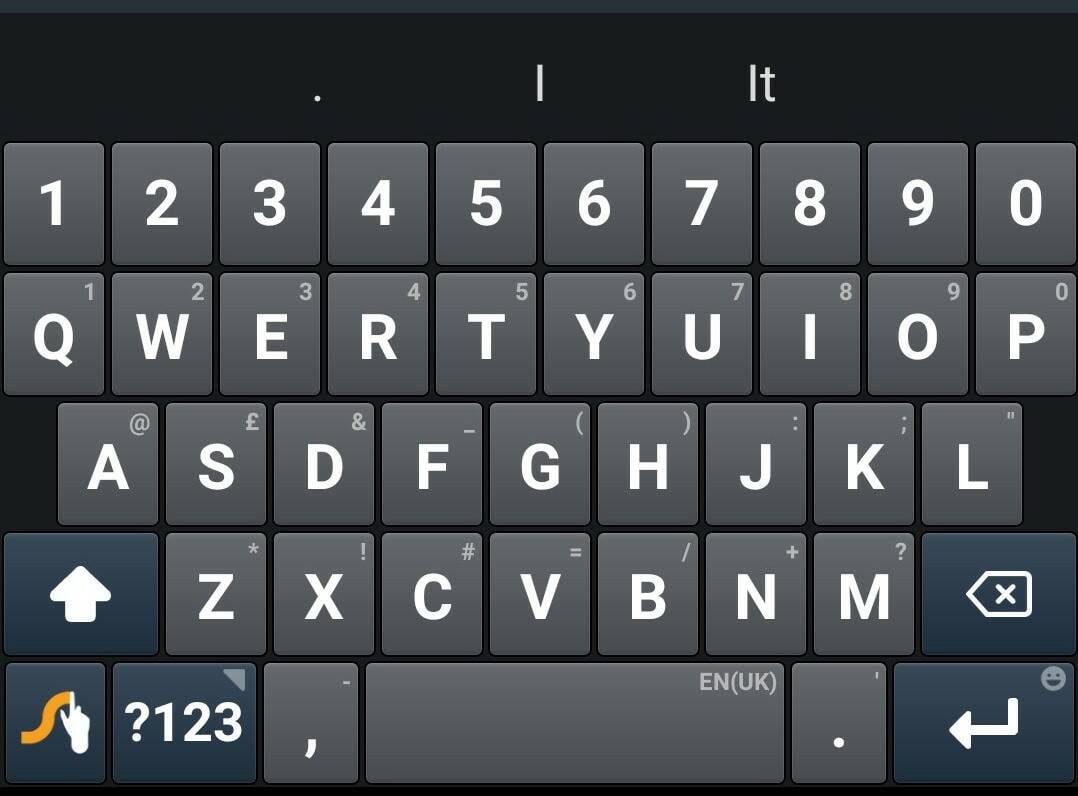
Swype's main keyboard, showing symbols in smaller, fainter text
Swype also has a few extra screens, although sadly most of them never made it over to the iOS version. One example is a special phone-number entry keypad, separate from the numbers-and-symbols screen. Google's keyboard can do this, but Swype's is easier to get at.
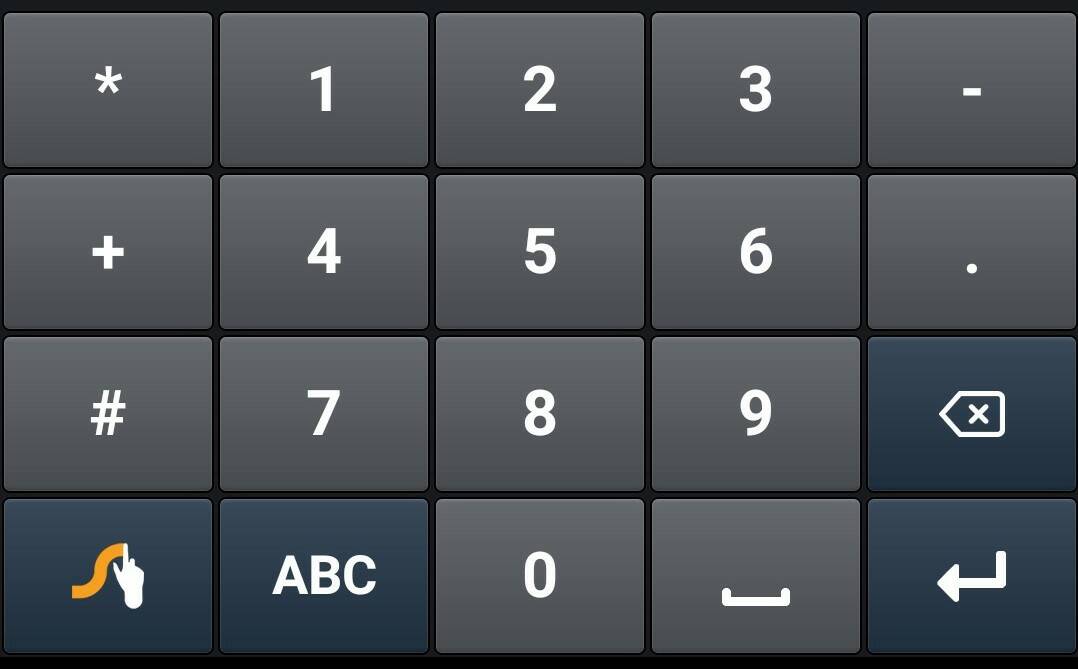
Swype's special dedicated keypad for entering phone numbers
Another is a cursor-keys screen, complete with cut/copy/paste keys, a key to select text with the cursor keys, a "select all" button and a tab key. This is very handy for precision editing, and both more functional and much less intrusive than Swiftkey, which optionally adds arrow keys to the bottom main keyboard.
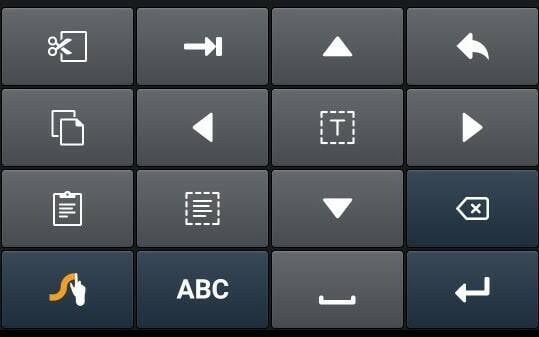
Swype also boasts a separate screen of editing keys
Several keyboards offer multilingual typing, but Swype lets you choose to have two languages at once, yet retain the ability to switch quickly to others via a long press on the spacebar. Alongside these, it has options for a smaller keyboard in one corner, for those with short thumbs, or a split keyboard for those toting tablets.
- Logitech's MX Mechanical keyboard, Master 3S mouse
- The Return of Gopher: Pre-web hypertext service is still around
- RIP, Swype: Thanks for all the sor--speec--speedy texting
- BOFH: Pass the sugar, Asmodeus, and let the meeting of the Fellowship of Bastards … commence
Swype's design is also more consistent than some rivals. For example, contrast Swiftkey's main screen with its symbols screen. Although it also shows symbols on the main alphabetical screen, about half of them are in different positions. This destroys muscle memory: either you need to remember two sets of positions, or hunt and peck every time.
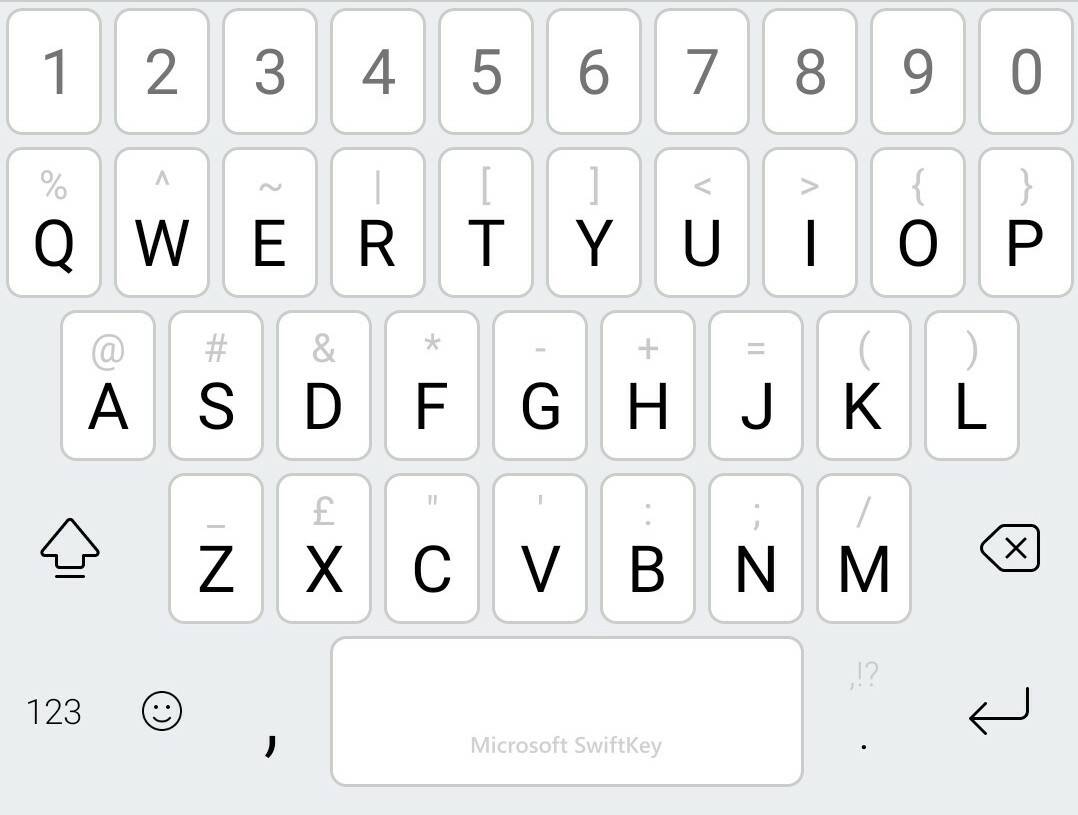
Swiftkey's main keyboard (with optional numbers row). Note that open and close parentheses are the last two entries in the first row

Swiftkey's symbols screen – and now, the parentheses keys have moved
Hey, Microsoft. Can we ask for a favour? We're willing to be flexible. You have multiple options here. You could put Swype back on sale. Or, you could bring these features across to Swiftkey. Or you could merge the apps, with Swype's gesture-entry but Swiftkey's prediction engine. Please, just take our money and bring Swype's best bits back. ®
From Chip War To Cloud War: The Next Frontier In Global Tech Competition
The global chip war, characterized by intense competition among nations and corporations for supremacy in semiconductor ... Read more
The High Stakes Of Tech Regulation: Security Risks And Market Dynamics
The influence of tech giants in the global economy continues to grow, raising crucial questions about how to balance sec... Read more
The Tyranny Of Instagram Interiors: Why It's Time To Break Free From Algorithm-Driven Aesthetics
Instagram has become a dominant force in shaping interior design trends, offering a seemingly endless stream of inspirat... Read more
The Data Crunch In AI: Strategies For Sustainability
Exploring solutions to the imminent exhaustion of internet data for AI training.As the artificial intelligence (AI) indu... Read more
Google Abandons Four-Year Effort To Remove Cookies From Chrome Browser
After four years of dedicated effort, Google has decided to abandon its plan to remove third-party cookies from its Chro... Read more
LinkedIn Embraces AI And Gamification To Drive User Engagement And Revenue
In an effort to tackle slowing revenue growth and enhance user engagement, LinkedIn is turning to artificial intelligenc... Read more